 Local Hair Color
practical examples
Hair color comparisons to try on your photo
A good hair-color preview starts with a photo in even light. Use the same picture for each comparison so changes in lighting or pose do not distract from the color. Local Hair Color is a visual planning tool; a salon result also depends on your starting color, hair condition, products, and technique.
Compare copper and brunette before an appointment
Choose a clear photo with the full outline of your hair visible. Preview Copper, then a brunette shade such as Chocolate, on the same image. Keep the intensity similar and tap Natural to compare each with the original. Save the versions you want to discuss with your colorist; describe them as color directions rather than exact dye formulas.
Clean up a preview around curls or flyaways
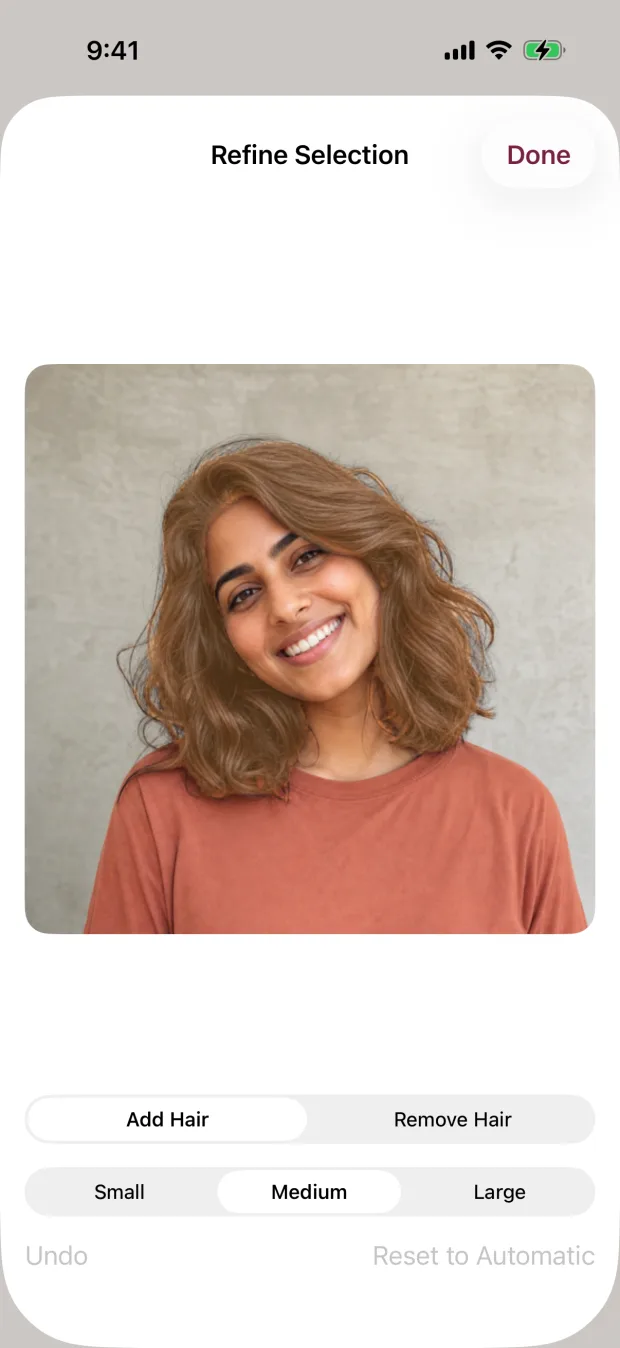
Pinch to zoom and inspect the selected hair at the edges, especially where it meets skin, clothing, and the background. Open Refine Selection and use Add Hair and Remove Hair to correct the selection before comparing shades. A color preview can look convincing at a small size while still having obvious edge errors when enlarged.
Test a bold color without losing sight of the original
Try a vivid preset such as Pink or Blue, or choose a custom color, then lower the intensity to explore a subtler version. Tap Natural to compare it with your original before saving. Use a well-lit photo rather than one with a strong colored filter.
Access and device requirements
Free download, with a free preview of a shade on your own photo during setup. Full photo and video editing, refinement, and export require weekly auto-renewing access or a one-time lifetime purchase. Existing yearly subscriptions can still be restored. Current localized prices and renewal terms appear in the app before purchase.
iPhone and iPad; requires iOS or iPadOS 17.0 or later. The App Store also lists compatibility with Apple silicon Macs (macOS 14 or later) and Apple Vision Pro.